

Size-colour order planner for clothing orders
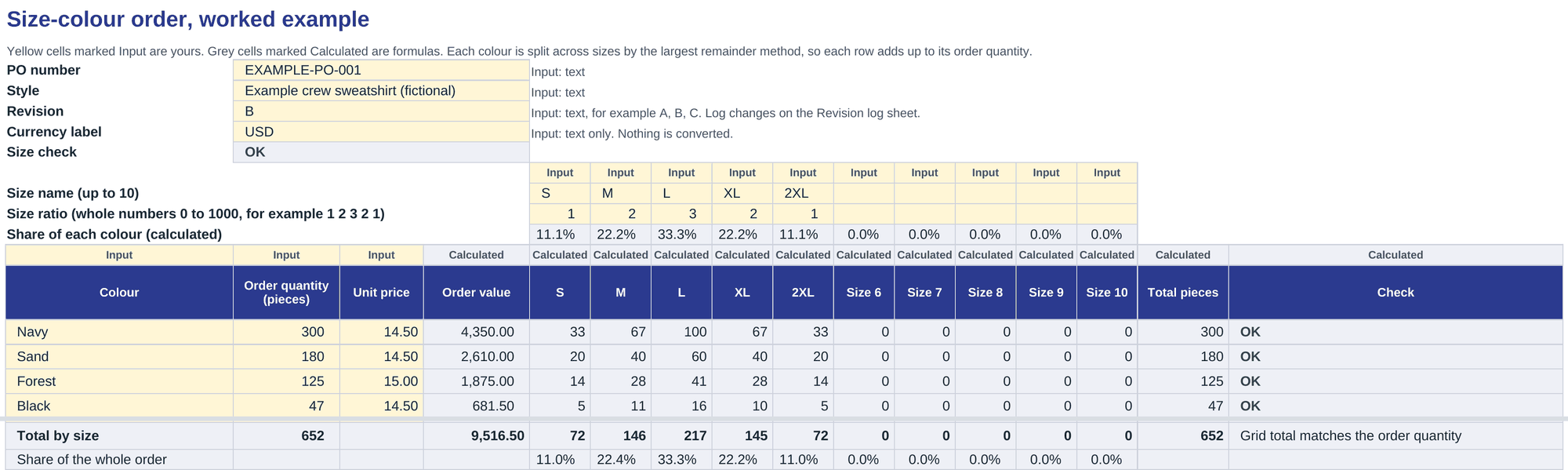
One workbook for one order. Enter up to 10 sizes with a size ratio and up to 12 colours with an order quantity. Each colour is split across sizes by the largest remainder method, so every row adds up to its quantity. Totals by size and colour, order value, and a packing sheet for solid-size cartons come with it.
One-time payment. Next you confirm on the checkout page, then pay on Whop.
$19 one-time, version 1.0.0. Whop sells it, takes payment and handles tax. The owner of MonsiTag never sees your card details.
A worked example
300 pieces of one colour, size ratio 1 : 2 : 3 : 2 : 1. Fictional data.
| Step | S | M | L | XL | 2XL | Total |
|---|---|---|---|---|---|---|
| Exact share | 33.33 | 66.67 | 100.00 | 66.67 | 33.33 | 300.00 |
| Rounded down | 33 | 66 | 100 | 66 | 33 | 298 |
| Final | 33 | 67 | 100 | 67 | 33 | 300 |
The 2 leftover pieces go to the sizes with the largest remainders. With 24 pieces per carton, the 33 pieces of size S need 2 cartons, the last one holding 9.
Is this for your label?
A fit if you
- A small brand or sample room that places size-colour orders and wants the grid, the totals and the carton counts in one place.
Not a fit if you
- Anyone who needs buyer-specific packing lists, carton dimensions or weights, sales forecasting, or an ERP. The size ratios are yours: the workbook does not know what will sell.
What is inside, exactly
4 files in one ZIP (monsitag-order-planner-v1.0.0.zip). The workbook has a Start here sheet, labelled Input and Calculated cells, and a fictional worked example next to a blank copy.

Full file list
| File | Format | What it is |
|---|---|---|
| 01_Size_Colour_Order_Planner.xlsx | XLSX | Size-colour order planner workbook. Start here sheet, Order and Packing sheets (a worked example and a blank copy of each), a Revision log, and Workings sheets that hold the helper cells. |
| CHANGELOG.md | Text | Change log. Version history. |
| LICENSE.txt | Text | License. What you may and may not do with the files. |
| README.txt | Text | Read me. File inventory, version, support contact. |
How it works
- Enter the orderPO number, style, revision, up to 10 sizes with a size ratio, and each colour with its quantity.
- Read the gridEach colour is split across sizes. Rows add up to the colour quantity. Totals by size and colour, and the order value, fill in.
- Plan the cartonsEnter pieces per carton. The Packing sheet shows cartons per size and colour and the pieces in each part carton.
- Log the changeAdd a line to the Revision log when the order changes.
Inputs are yellow and labelled "Input". Formulas are grey and labelled "Calculated". A Check column says OK, Partial or Problem on every row. A blank is not a zero.
What it does not do
It organises numbers you enter. It is an operational worksheet, not commercial terms, a contract or legal advice.
- It is an operational worksheet, not commercial terms or legal advice.
- It does not know carton sizes, weights or buyer packing rules.
- Size ratios must be whole numbers from 0 to 1000. Order quantities must be whole numbers up to 10,000,000.
- Up to 10 sizes and 12 colours per sheet.
Price, delivery and refunds
Write to [email protected]. Future versions and new features are not promised. The files come with a license file on the same terms as the license: use them in your own business and edit them freely, but do not resell or share them.
Questions before you buy
How does it split a colour across sizes?
Each size gets quantity times ratio, divided by the sum of ratios, rounded down. The pieces left over go one at a time to the sizes with the largest remainders. The rows always add up. It is the same method as the free size ratio calculator, and the tie-break order is the same.
What if two remainders are equal?
The size with the larger ratio goes first, then the earlier size in your list. The result never depends on chance.
Can I try the method before buying?
Yes. The free size ratio calculator uses the same method for one order at a time.
Will it open in Excel and Google Sheets?
The formulas were recalculated in LibreOffice and compared with an independent calculation in automated tests. They use ordinary functions such as IF, SUM, MOD and COUNTIFS. If something fails in your spreadsheet app, email me and I will fix it.
Is there a subscription?
No. It is one payment. See your order for delivery and downloads.
Try it on one order first
Check the method on one order with the free size ratio calculator, or clean a product CSV with the product CSV checker. Prefer to hand the catalog work over? See Apparel Catalog Rescue. Weighing this against a free sheet or your own spreadsheet? Read the comparison.
BOM and Consumption Planner
List a style's materials, add wastage, and see material cost per garment and what to buy.
$19 one-time
Starter Toolkit
Garment costing and supplier quote workbooks, RFQ and purchase order templates, two checklists and a guide.
$39 one-time