

Production T&A calendar for clothing orders
One workbook for one order. Enter a ship date, pick Monday to Friday or Monday to Saturday, and list each milestone with its working days before ship. Planned dates are worked back around weekends and your holidays. Add owners and actual dates to see what is done, late or due soon.
One-time payment. Next you confirm on the checkout page, then pay on Whop.
$19 one-time, version 1.0.0. Whop sells it, takes payment and handles tax. The owner of MonsiTag never sees your card details.
A worked example
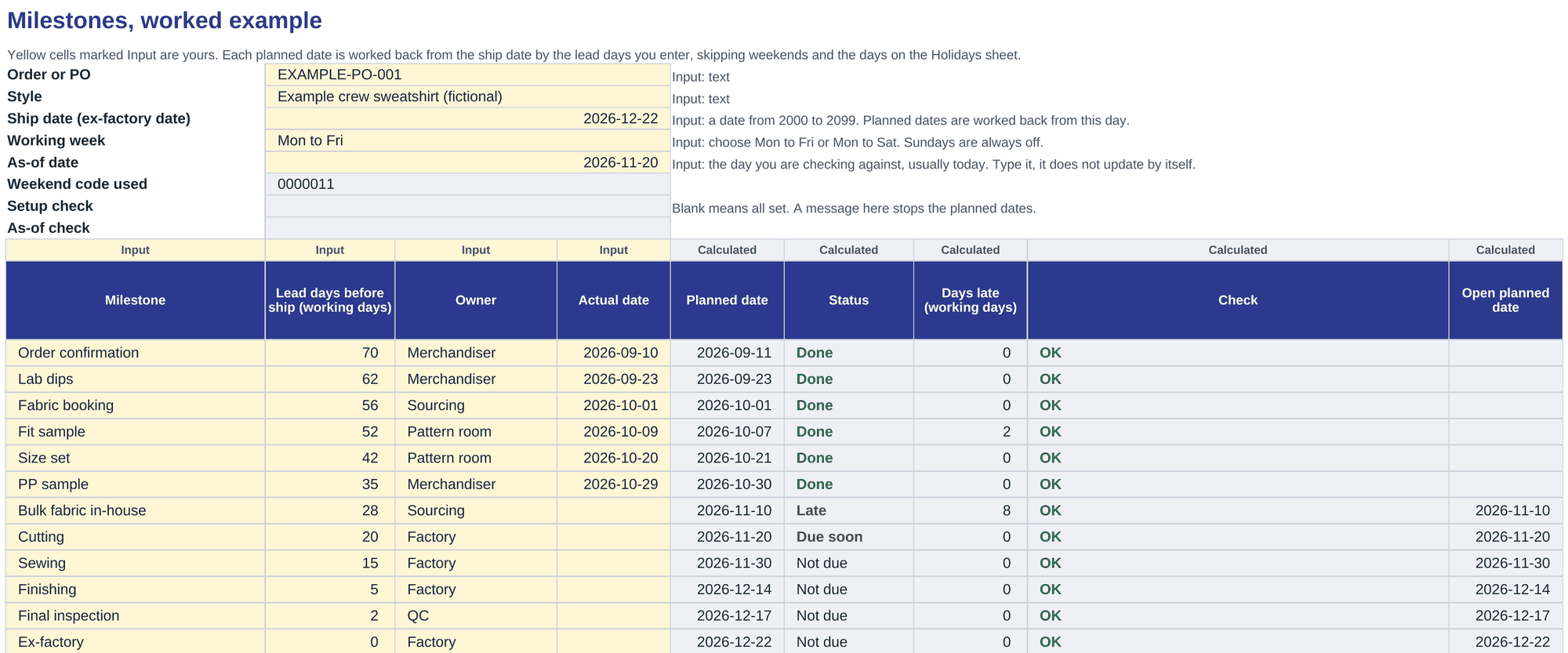
Ship date 2026-12-22, Monday to Friday, checked on 2026-11-20. Two factory closure days, 2026-11-26 and 2026-12-18, are skipped. Fictional data.
| Milestone | Lead days | Planned | Actual | Status | Days late |
|---|---|---|---|---|---|
| PP sample | 35 | 2026-10-30 | 2026-10-29 | Done | 0 |
| Bulk fabric in-house | 28 | 2026-11-10 | Late | 8 | |
| Cutting | 20 | 2026-11-20 | Due soon | 0 | |
| Sewing | 15 | 2026-11-30 | Not due | 0 | |
| Ex-factory | 0 | 2026-12-22 | Not due | 0 |
Lead days are working days before the ship date. Days late are working days. The lead days are an example you can change.
Is this for your label?
A fit if you
- A small brand or merchandiser who gives a factory a ship date and wants every milestone dated backward from it, with an owner and a clear list of what is late.
Not a fit if you
- Anyone who needs a link to a factory or ERP system, automatic reminders, a Gantt chart or a promise about what a factory will deliver. The lead days are yours: the workbook does not know any factory's lead times.
What is inside, exactly
4 files in one ZIP (monsitag-ta-calendar-v1.0.0.zip). The workbook has a Start here sheet, labelled Input and Calculated cells, and a fictional worked example next to a blank copy.

Full file list
| File | Format | What it is |
|---|---|---|
| 01_Production_TA_Calendar.xlsx | XLSX | Production T&A calendar workbook. Start here sheet, Milestones, Summary and Holidays sheets (a worked example and a blank copy of each), and a default list of twelve milestones you can edit. |
| CHANGELOG.md | Text | Change log. Version history. |
| LICENSE.txt | Text | License. What you may and may not do with the files. |
| README.txt | Text | Read me. File inventory, version, support contact. |
How it works
- Set the ship dateType the ship date, choose Monday to Friday or Monday to Saturday, and type today's date as the as-of date.
- Edit the milestonesChange the names and the working days before ship for each one. Add owners.
- Add the holidaysList public holidays and factory closures. They are skipped in every date and every count.
- Enter actual datesType the actual date when a milestone is finished. Status and days late update, and the Summary names the next milestone due.
Inputs are yellow and labelled "Input". Formulas are grey and labelled "Calculated". A Check column says OK, Partial or Problem on every row. A blank is not a zero.
What it does not do
It organises numbers you enter. It is an operational worksheet, not commercial terms, a contract or legal advice.
- It is a planning worksheet. Nothing connects to a factory or ERP system, and nothing is sent or reminded.
- The default milestones and lead days are a starting list to edit, not an industry standard.
- The as-of date is typed in. It does not update by itself.
- Up to 20 milestones and 50 holiday dates per sheet. Dates from 2000 to 2099.
Price, delivery and refunds
Write to [email protected]. Future versions and new features are not promised. The files come with a license file on the same terms as the license: use them in your own business and edit them freely, but do not resell or share them.
Questions before you buy
How is the planned date worked out?
The ship date minus the lead days, counting only working days. Weekends (Sunday, or Saturday and Sunday) and the dates on your holiday list are skipped. A milestone with 0 lead days is planned for the ship date itself.
What counts as late?
With no actual date, a milestone is Late once a working day has passed since its planned date. It is Due soon if planned for today or the next 3 working days, otherwise Not due. With an actual date it is Done, and days late show how late it finished. Days late are working days.
Are the default lead days right for my factory?
No one can say that for you. They are a starting list. Set the days from your own factory's lead times.
Will it open in Excel and Google Sheets?
The formulas were recalculated in LibreOffice and compared with an independent calculation in automated tests. They use ordinary functions such as WORKDAY.INTL and NETWORKDAYS.INTL. If something fails in your spreadsheet app, email me and I will fix it.
Is there a subscription?
No. It is one payment. See your order for delivery and downloads.
Try it on one order first
Check the method on one order with the free size ratio calculator, or clean a product CSV with the product CSV checker. Prefer to hand the catalog work over? See Apparel Catalog Rescue. Weighing this against a free sheet or your own spreadsheet? Read the comparison.
Size-colour Order Planner
Split each colour across sizes, then plan cartons, in one Excel workbook.
$19 one-time
BOM and Consumption Planner
List a style's materials, add wastage, and see material cost per garment and what to buy.
$19 one-time